
Fomo is built so you can go from download to first trade in a few minutes. This guide walks through each step in order, with the details Fomo’s help center says trip people up.
1. Get the app, or use the web
Fomo is on the App Store for iPhone and iPad and on Google Play for Android. The listing is called “fomo - never miss out” and the publisher is FOMO Labs. You can also use Fomo in a desktop browser at fomo.family with the same account. Our download guide covers how to make sure you have the real thing.
2. Create your account, and add a referral code
You sign up with your Apple ID or Google account. There’s no lengthy verification at signup and no seed phrase to write down. Fomo creates two non-custodial wallets for you: one on Solana and one that works across its EVM chains.
Two things to get right at this step:
- Enter a referral code now if you want one. Fomo applies codes on the signup screen only, and there’s no field to add one later. A code gives you 10% off trading fees, so the standard 0.50% becomes 0.45%.
- Remember which login you used. Your account is tied to that Apple ID or Google account. Signing in later with a different one creates a separate, empty account.
After signing up you can set up your profile and connect your X account (Profile → Settings → Account).
3. Add funds
Tap Deposit on the home screen (or the plus sign next to your cash balance on your profile). Depending on your country and account, you’ll see up to four methods:
- Crypto: send USDC from another wallet or exchange. Available everywhere Fomo is.
- Debit card: a bank-issued debit card, landing in your cash balance as USDC, usually within minutes.
- Apple Pay: buys a specific token directly, rather than topping up your cash balance.
- Exchanges and apps: Pay with Coinbase, and on some accounts Cash App.
Your cash balance is USDC, and one balance covers all seven chains Fomo supports. The deposit guide has the network rules and minimums.
4. Find a token
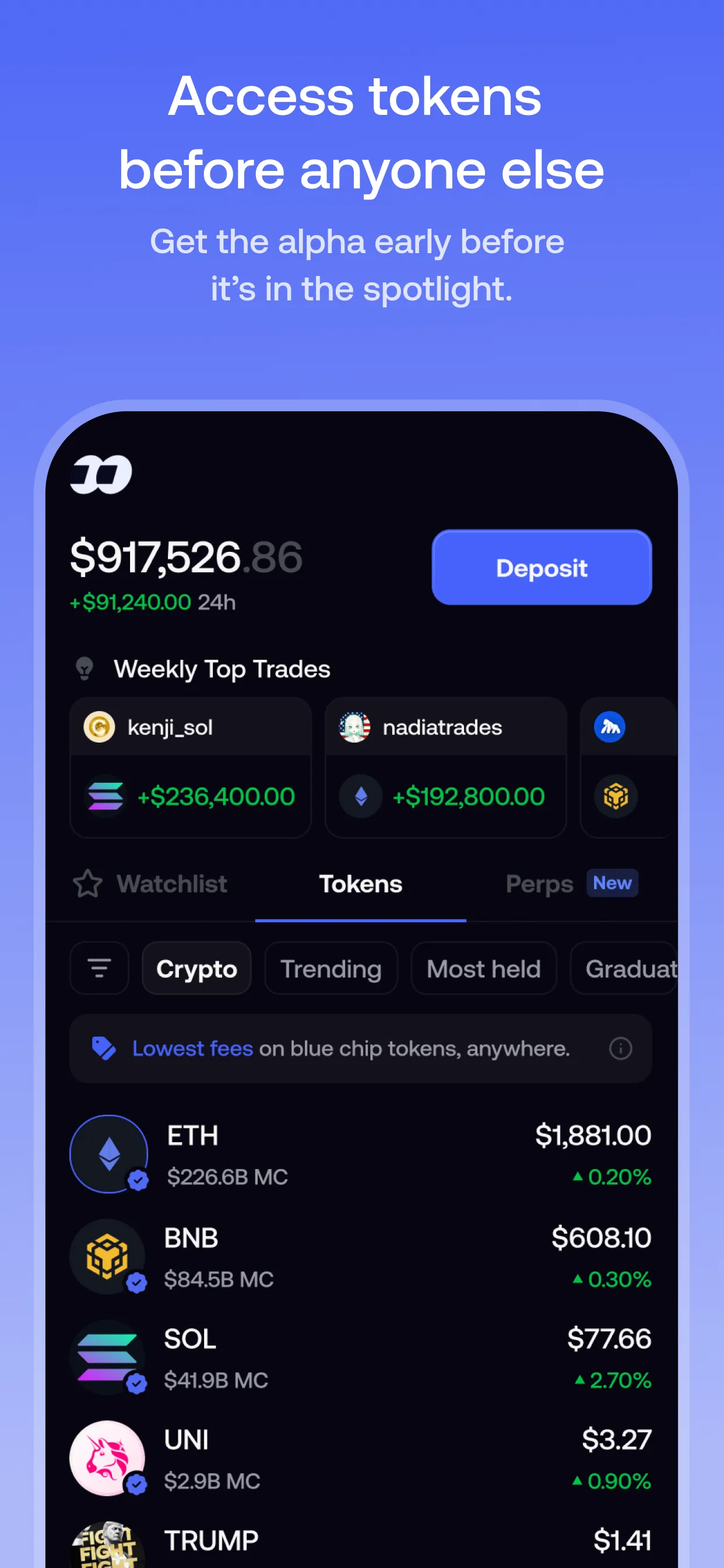
The home screen shows your portfolio, a Weekly Top Trades section and three tabs: Watchlist, Tokens and Perps. The Tokens list has filters:
- Crypto: established tokens such as BTC, ETH and SOL, with Fomo’s lowest fee (0.05%).
- Trending: what’s trending on Fomo, weighted by volume.
- Most held, Gainers (top 24-hour movers) and Community (verified tokens whose creators are on Fomo).
- Graduated and Bonding: brand-new tokens around the bonding-curve stage. Fomo shows a caution banner here because anyone can launch them.
You can also search by name or contract address, which is the reliable way to find the exact token you mean. Check the token’s label first: a blue check means Fomo has reviewed it, while unverified tokens show a warning popup. Our token research guide covers what to look at before buying.
5. Buy
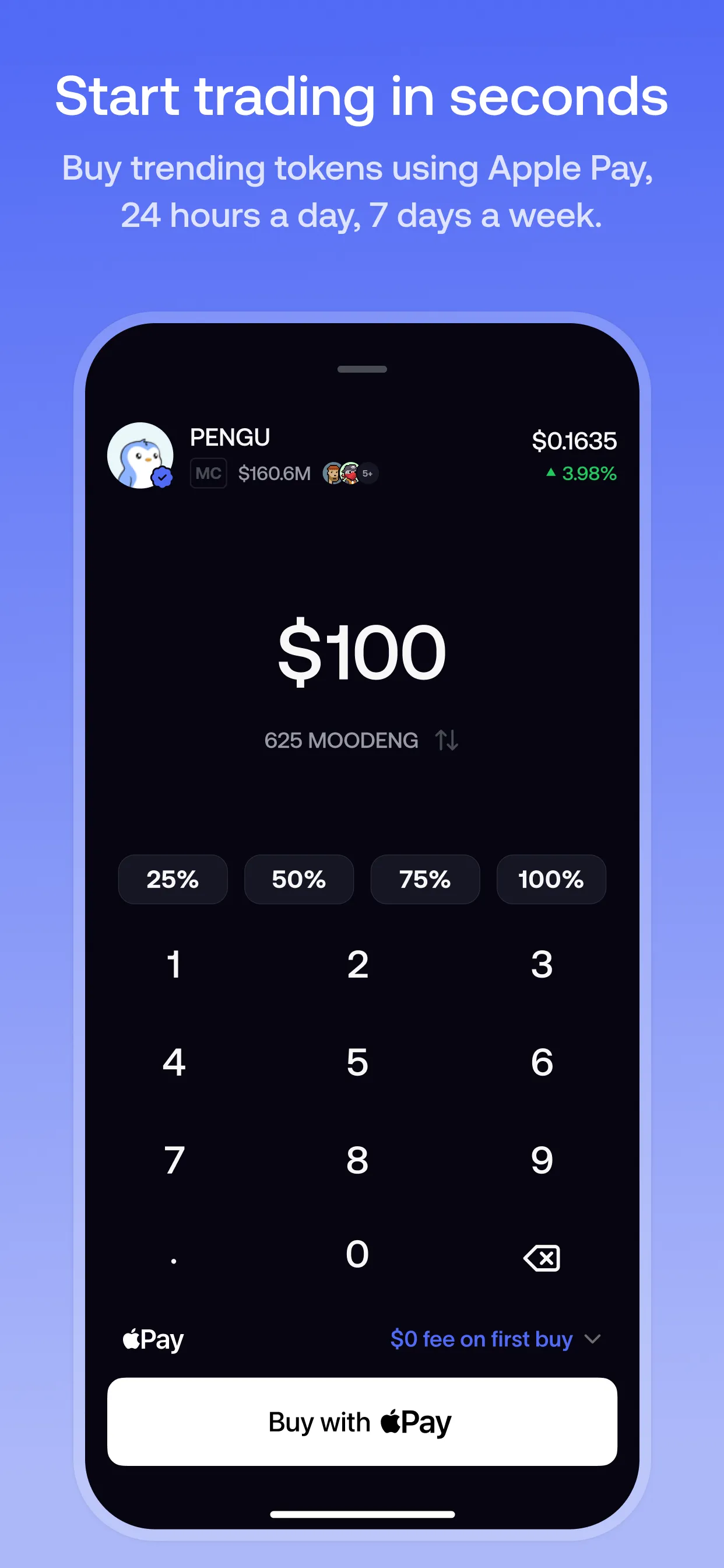
On the token page, tap Buy, enter an amount and review the quote. Before you confirm, Fomo shows the expected value of your trade based on current liquidity, plus a fee summary. If there are two fee lines, one is Fomo’s fee and the other is the network fee. On Solana, Fomo covers the network costs. On other chains you pay them on top of Fomo’s fee.
If a token has a severe warning label, the app asks you to confirm “I understand the risks” before buying. Treat that as a real warning. And if the network fee is a large share of a small trade, the app asks you to confirm that too.
6. Track your position
Your profile shows open positions (entry price, current value, unrealized profit) and closed positions (realized profit). While you hold, the percentage reflects your total return on that position, including anything you’ve already sold. The clock icon on your profile opens your full history, filterable by transfers, trades and cash.
The chart at the top of your profile shows your total account value. It drops when you withdraw money, which isn’t a loss.
7. Sell
Selling works the same way in reverse. A few limits to know:
- The minimum sell is 2 USDC on most networks and 5 USDC on Ethereum. Smaller leftovers (“dust”) can’t be sold in the app.
- If a token shows a big value but the sell finds no route, the liquidity has usually been pulled. That value can’t be realized anywhere.
- Your realized result is based on the actual execution price, which can differ from the last quote on volatile tokens.
Sale proceeds go back to your cash balance. To move money out, see withdrawals.
8. Use the social side
The middle tab of the app is the social feed: live trades and theses from traders across Fomo. Follow traders to build a Friends-only feed and get notified when they trade, and use the leaderboard to find new people to follow. Fomo doesn’t do copy trading, so every trade is still yours to place. Read how social trading on Fomo works and how to evaluate top traders.
Trading tokens is risky, especially new and low-liquidity ones. Only trade what you can afford to lose.
Sources
- Creating your fomo account · Fomo Help Center, updated 23 Apr 2026
- How referral codes and fee discounts work · Fomo Help Center, updated 12 Oct 2026
- Navigating the app · Fomo Help Center, updated 8 Oct 2026
- How to deposit funds · Fomo Help Center, updated 8 Oct 2026
- Browsing tokens on fomo · Fomo Help Center, updated 8 Oct 2026
- Trading fees on fomo · Fomo Help Center, updated 8 Oct 2026
- How tokens are labeled and verified on fomo · Fomo Help Center, updated 19 May 2026
- Why can't I buy or sell this token · Fomo Help Center, updated 8 Oct 2026
- Understanding your PnL · Fomo Help Center, updated 23 Apr 2026
- Transaction history · Fomo Help Center, updated 23 Apr 2026
- What happens to small remaining balances · Fomo Help Center, updated 5 Oct 2026
- The social feed · Fomo Help Center, updated 23 Apr 2026
- Following other traders · Fomo Help Center, updated 13 Sept 2026
- Withdrawing to your bank account · Fomo Help Center, updated 8 Oct 2026
- Withdrawing to an external wallet · Fomo Help Center, updated 12 Oct 2026
- Announcing fomo web · Fomo blog, updated 29 Apr 2026
Product details checked against these sources on 16 Oct 2026. Fomo can change its app, fees and policies; the live app is the final word.