
The feed: trades as they happen
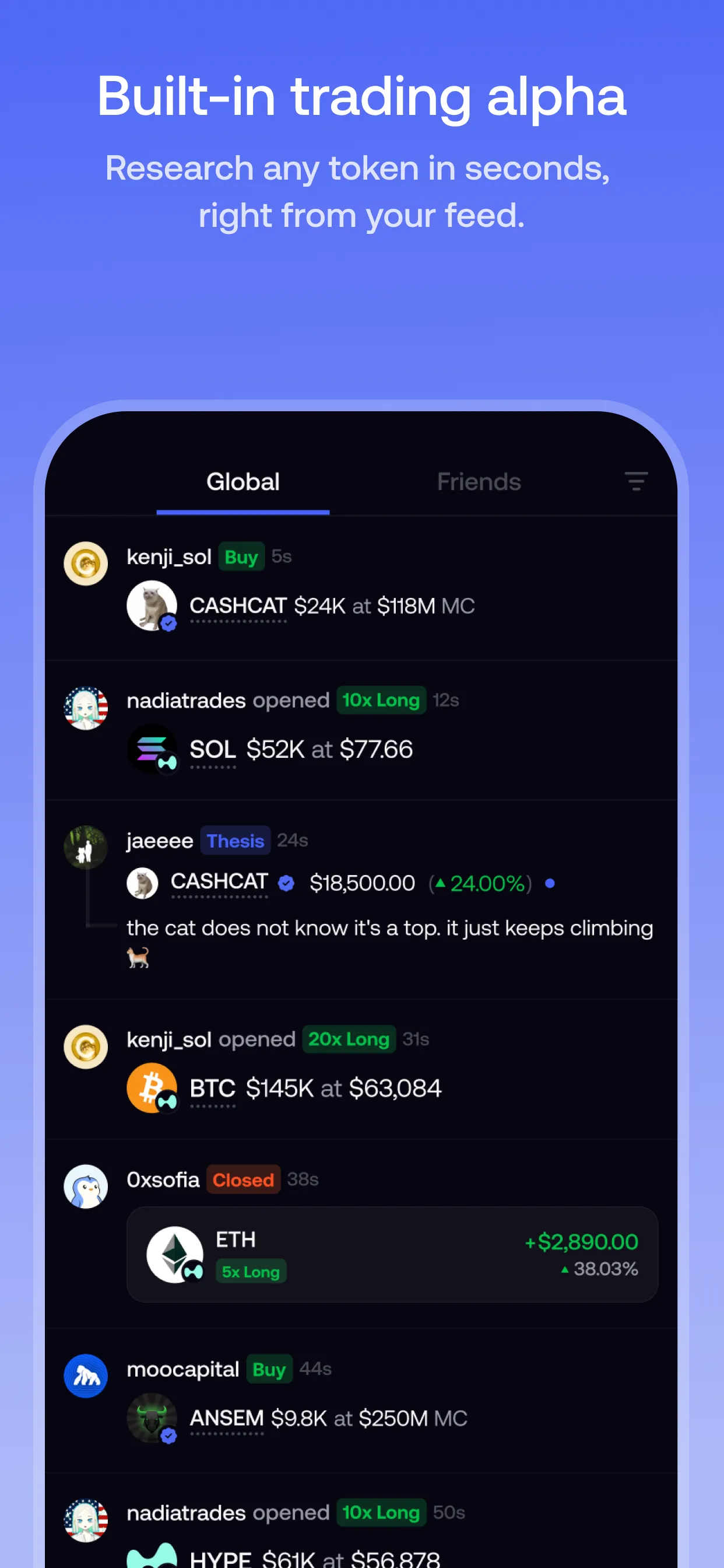
The feed is the middle tab in Fomo’s bottom bar. It shows trades and thesis posts from traders on Fomo as they happen. At the top, switch between:
- All: activity across the whole platform.
- Friends only: just the traders you follow.
Each post shows who traded, which token, how much and their profit or loss. Tap a post for the full details.
Token pages have a feed too. On any token’s Feed tab you can filter to theses only, to read why people hold it, or to friends only, to see what people you follow are doing with it.
Theses: the reasoning behind a trade
A thesis is a trader’s written take on a token, up to 3,000 characters. The position is attached automatically, so readers can see the trader actually holds what they’re talking about, along with its current value and profit or loss.
What to know about theses:
- Where they appear: the trader’s profile, the token’s feed and the global feed.
- When they can be posted: while the position is open, and up to 3 hours after closing it. Updates stack, newest first, so you can see how someone’s view changed.
- Not every thesis reaches every feed. Other traders see a thesis in a token’s feed only if the position clears their minimum position-size filter, which defaults to around 1,000 USDC. Spam scoring can also hold back repetitive posts.
You can post your own from the page of any token you hold, or during the buy flow.
Following traders
Tap Follow on a trader’s profile or on any of their posts. Following:
- adds their buys, sells and theses to your Friends-only feed;
- adds them to your Friends list (the fourth tab), where you can compare followed traders’ profit by percentage or dollars over 24 hours, 7 days or 30 days;
- sends you notifications when they trade, if notifications are on, above a threshold you set.
There’s a cap on how many traders you can follow. Fomo says it grows as you use the app more.
Notifications you can turn on
In Profile → Settings → Notifications you can switch on or off: price alerts on tokens you hold, friends’ activity, trending activity, top traders’ activity, Fomo announcements, new followers and referrals. Price alerts fire when a token you hold makes a large move since you bought it. You can’t set an alert at a specific price.
Clans
Clans are groups of traders inside Fomo. Fomo’s App Store listing describes them as “groups of traders who share their positions, ranked by everyone’s combined profit and loss,” with rankings over 24 hours, 7 days and 30 days.
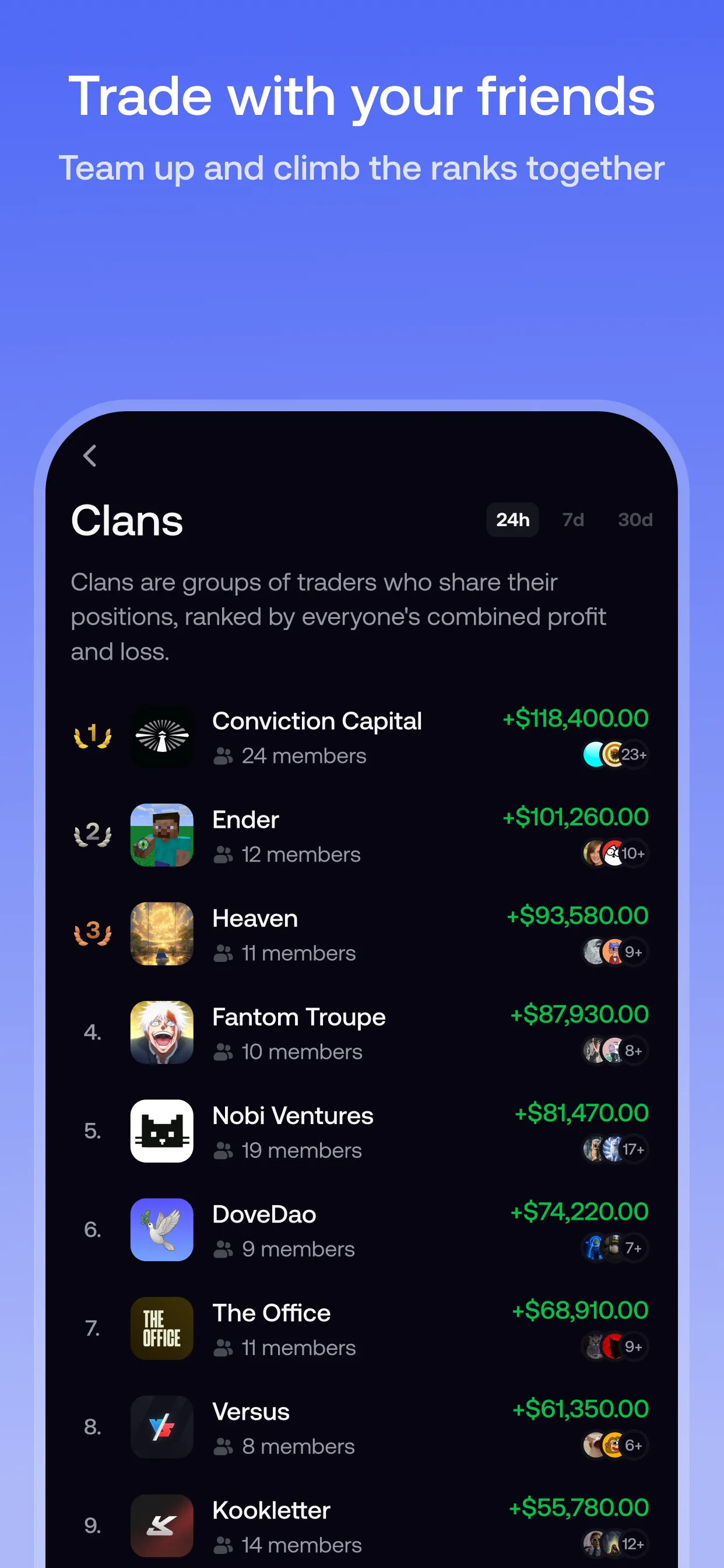
A clan doesn’t pool money. Each member still trades their own balance and takes their own risk. What a clan gives you is a smaller, named group to watch instead of the whole feed, and a ranking that shows which groups are doing well as a team. Fomo’s help center doesn’t document clans in detail yet, so check the app for how to join or start one.
Fomo has no copy trading
Fomo’s help center is direct about it: Fomo doesn’t have a copy trading feature. Following someone never places trades for you. If you act on something in the feed, you place your own order at the current price.
That’s a meaningful difference from tools like GMGN, which can automatically mirror another wallet’s trades. We compare the two in Fomo vs GMGN.
Also note: tapping Send on a trader’s profile sends them money from your wallet. It’s a transfer, not a copy trade.
Using social signals without following blindly
The feed shows you what people are buying. It can’t tell you whether you should. A few habits help:
- You’re always later. By the time you see a trade, the trader already bought at an earlier price. Check the price now, not theirs.
- Size matters. A thesis from someone with a large position is more meaningful than one from a tiny position, and Fomo’s feed filter already leans this way.
- Read the reasoning, then check the token. Look at liquidity, holders and labels before buying. Our token research guide explains what to check.
- Look past one trade. A single big win says little. See how to evaluate top traders.
Connecting X
You can connect your X (Twitter) account under Profile → Settings → Account. An X account can only be linked to one Fomo account at a time.
Sources
- The social feed · Fomo Help Center, updated 23 Apr 2026
- Posting a thesis · Fomo Help Center, updated 8 Oct 2026
- Following other traders · Fomo Help Center, updated 13 Sept 2026
- Notifications · Fomo Help Center, updated 8 Oct 2026
- Does fomo have copy trading · Fomo Help Center, updated 19 May 2026
- Leaderboard · Fomo Help Center, updated 8 Oct 2026
- Connecting your X (Twitter) account · Fomo Help Center, updated 23 Apr 2026
- Sending to another fomo user · Fomo Help Center, updated 23 Apr 2026
- Announcing fomo web · Fomo blog, updated 29 Apr 2026
- fomo - never miss out (App Store listing) · Apple App Store
Product details checked against these sources on 16 Oct 2026. Fomo can change its app, fees and policies; the live app is the final word.