
Step 1: find the right token
Names and tickers get copied. Search by contract address in Fomo’s search tab when you know which token you want, and be wary of a near-identical name you weren’t expecting.
Tokens that appear in your wallet without you buying them are usually airdropped scams, often showing a fake dollar value. Don’t interact with them.
Step 2: read the label
Every token on Fomo has a status:
- Verified (blue check). Reviewed by Fomo’s team. To qualify, a token needs at least $1M daily volume, a $5M market cap, at least 1,000 holders, and a name and symbol that don’t copy another verified project. Verification doesn’t make a token safe or guarantee its price.
- Unverified. Not reviewed. Opening its page shows a popup telling you to be cautious and do your own research. Every newly graduated token starts here.
- Warning label. Fomo’s automated checks found signs of risk, such as a contract that blocks sells, illiquid pools or a developer who removed liquidity. Read the warning in full before going further.
A severe warning doesn’t disable trading. In the app you confirm “I understand the risks” before buying a token you haven’t traded. Acknowledging the warning doesn’t remove the risk.
Step 3: check the numbers
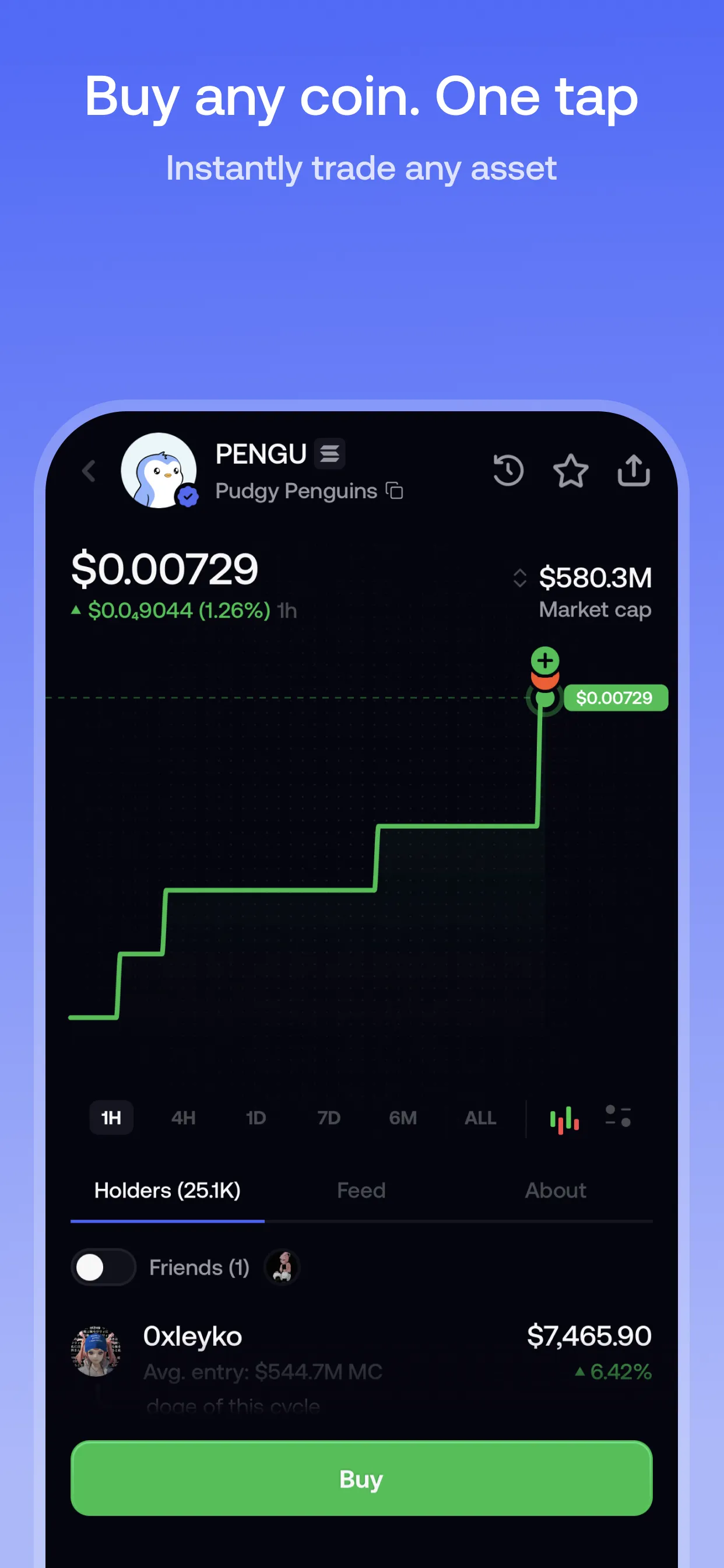
Fomo’s token pages show liquidity, buy and sell volume, buyer-to-seller ratios, holder count and top-holder concentration. Charts come in candlestick and line formats, with other traders’ buys and sells marked on them.
| Stat | What it tells you | Watch for |
|---|---|---|
| Liquidity | How much is in the pool you trade against | Low or recently removed liquidity. It means big price impact now and trouble selling later |
| Market cap | Price × circulating supply: how big the token already is | Judging by price alone. A $5 token can be “cheaper” than a $1 one |
| Volume | How much has traded over a period | High volume with few holders, which can mean bot activity |
| Holders and concentration | How widely the token is held | A few wallets holding a large share of supply |
| Buy/sell ratio | Whether buying or selling dominates | Sellers consistently outpacing buyers |
Compare like with like: a 24-hour volume figure can’t be compared with another token’s 1-hour figure.
Step 4: understand price impact and slippage
Price impact is how much your own order moves the price. Slippage is the gap between the price you expected and the price you got. Both come mostly from liquidity.
An illustrative example from Fomo’s own explainer: a $5,000 buy in a token with $100,000 of liquidity is 5% of the pool, enough to push your average price well above the price you saw. The same order in a pool with $1,000,000 of liquidity barely moves it.
On Fomo, the quote before you confirm shows the expected value of your trade based on current liquidity, and reflects significant price impact. Practical habits:
- Recheck the quote after changing the amount. If a small increase in size changes the expected result a lot, the pool is thin.
- Size to the liquidity. On thin tokens, a smaller order can save more than any fee discount.
- Remember the exit. Your realized result is based on the actual execution price. A large paper gain on a thin token may not survive selling.
Step 5: know the costs that aren’t Fomo’s fee
Some tokens charge their own fee on every buy and sell, written into the contract by their creators, for example on certain launchpads. These are separate from Fomo’s trading fee. Fomo’s own fees are explained in our fee guide.
When you can’t sell
Fomo’s help center lists the usual reasons:
- The position is too small. The minimum sell is 2 USDC on most networks and 5 USDC on Ethereum.
- The liquidity has gone. If a token shows a big value but no sale route, the pool has usually been drained. That value can’t be realized in Fomo or any other app.
- The contract blocks selling. Some contracts block sales or specific wallets. No platform can override this, and Fomo can’t recover funds in a token that can’t be sold.
None of these checks make a token safe. They help you spot problems before your money is in.
A quick pre-trade checklist
- Right token? Contract address checked.
- Label read: verified, unverified or warning?
- Liquidity big enough for your order and for selling later?
- Holder concentration reasonable?
- Quote checked after setting your final amount?
Sources
- How tokens are labeled and verified on fomo · Fomo Help Center, updated 19 May 2026
- Token verification on fomo · Fomo Help Center, updated 8 Oct 2026
- Browsing tokens on fomo · Fomo Help Center, updated 8 Oct 2026
- Why can't I buy or sell this token · Fomo Help Center, updated 8 Oct 2026
- Protecting yourself from scams · Fomo Help Center, updated 8 Oct 2026
- Trading fees on fomo · Fomo Help Center, updated 8 Oct 2026
- Understanding your PnL · Fomo Help Center, updated 23 Apr 2026
- There is a random token in my wallet I never bought · Fomo Help Center, updated 6 Oct 2026
- How Do I Read Token Stats Before Buying? · Fomo Answers, updated 19 Feb 2026
- What Is Slippage in Crypto Trading? · Fomo Answers, updated 19 Feb 2026
- Decoding Token Stats: What is Market Cap, Liquidity, and Volume · Fomo blog, updated 25 Dec 2025
Product details checked against these sources on 16 Oct 2026. Fomo can change its app, fees and policies; the live app is the final word.