
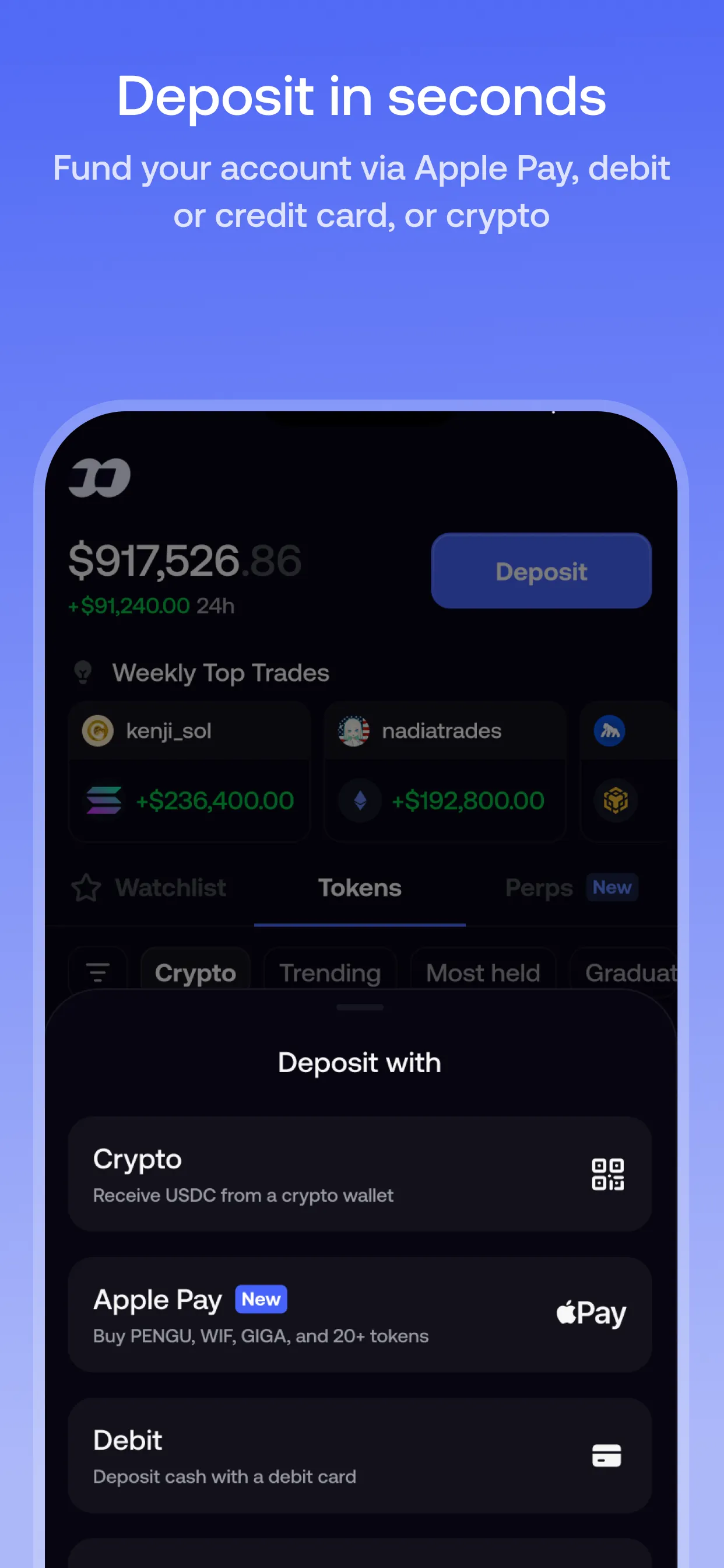
The four deposit methods
Tap Deposit on the home screen. Fomo only shows the methods available to your account, so you may not see all four.
| Method | What it does | Where the money lands | Availability |
|---|---|---|---|
| Crypto | Receive USDC from another wallet or exchange | Cash balance | Everywhere Fomo is available |
| Debit card | Pay with a bank-issued debit card | Cash balance, as USDC, usually within minutes | Depends on your country |
| Apple Pay | Buy a specific token directly | That token, not your cash balance | Depends on region and account |
| Exchanges and apps | Pay with Coinbase (some accounts also see Cash App) | Cash balance | Needs a Coinbase account; varies by account |
Depositing USDC from a wallet or exchange
Go to Deposit → Crypto, choose the network your USDC is on, copy the address Fomo shows, and send only USDC on that same network. It arrives once the transaction confirms, usually within seconds to a few minutes.
| Network | Asset to send | Minimum that credits |
|---|---|---|
| Solana | USDC | None |
| Base, BNB Chain, Monad | USDC | 0.50 |
| Ethereum | USDC | 15 (Fomo says this can change) |
| Robinhood Chain | USDG, not USDC | 0.50 USDG |
- Match the network. Each network is a separate blockchain. USDC sent on a network that doesn’t match the address won’t show up in the app.
- Robinhood Chain is different. Send USDG there, not USDC. It converts automatically into your USDC cash balance. Don’t send USDG on any other network.
- Arc is supported for trading and withdrawals, but not for deposits.
- Below the minimum, funds wait at your deposit address until a top-up on the same network takes the total over the line.
If you don’t have USDC yet, Fomo suggests buying it on an exchange that operates in your country, then sending it to your Fomo address.
Depositing with a debit card
Choose Debit Card, enter the amount, then your card number, expiry, CVV and billing address. Funds land as USDC and are usually ready to trade within a few minutes. You can also switch this screen to Apple Pay to pay with a debit card saved in your Apple Wallet. That route also lands in your cash balance.
Fomo accepts bank-issued debit cards only. Prepaid and virtual cards are declined, including Cash App Card, Venmo, PayPal and Apple Cash. Common reasons a card is declined:
- The billing address, ZIP or postcode, or CVV doesn’t exactly match what your bank has on file.
- Your bank blocks crypto purchases by default. A call to the bank usually clears it.
- Card deposits aren’t supported in your country.
A pending charge on a failed deposit is a temporary authorization hold, not a payment. Your bank releases it on its own, usually within 1 to 3 business days.
Buying with Apple Pay
Apple Pay through the Apple Pay option is a token purchase, not a deposit. Go to your profile, tap the three dots next to your cash balance, then Deposit more → Apple Pay, pick a token from the list, enter the amount and authorize. Depending on your account, there may be a weekly spending limit and a cap on the number of purchases. The deposit screen shows what you have left.
Seeing a payment provider’s name on your bank statement instead of Fomo’s is normal: that provider handled the payment.
Pay with Coinbase and Cash App
Under Exchanges and apps, Pay with Coinbase lets you fund Fomo from your Coinbase balance, so it needs a Coinbase account. You don’t need Coinbase for card or Apple Pay deposits. Some accounts also see Cash App here; if yours does, you complete the payment in Cash App and it arrives as USDC.
Deposits on Fomo web
Fomo web uses the same account and balance as the app. When Fomo launched the web version in April 2026, it said new web users could fund with crypto right away and use the mobile app for Apple Pay and debit card deposits. See the Fomo web guide.
If a deposit doesn’t show up
- Check the network and asset. Most missing deposits were sent on a network that doesn’t match the address, or below the network’s minimum.
- Check the address. Your Solana and EVM addresses are under Profile → Settings → Account.
- Look up the transaction on the network’s block explorer to confirm it reached your address.
- Contact support from inside the app with the transaction hash and network if everything checks out.
Sent USDC to your Fomo EVM address on a network Fomo doesn’t credit, such as Arbitrum or Polygon? The funds are still yours. Fomo’s help center explains how to recover them by exporting your EVM key into a wallet that supports that network. Funds sent to an address you don’t control can’t be recovered.
Sources
- How to deposit funds · Fomo Help Center, updated 8 Oct 2026
- Depositing with crypto (USDC) · Fomo Help Center, updated 12 Aug 2026
- Depositing with a debit card · Fomo Help Center, updated 7 Jul 2026
- Apple Pay · Fomo Help Center, updated 23 Apr 2026
- Do I need a Coinbase account to deposit · Fomo Help Center, updated 8 Oct 2026
- Can I deposit with Cash App, Venmo, or PayPal · Fomo Help Center, updated 5 Oct 2026
- What if card deposits aren't available in my country · Fomo Help Center, updated 3 Sept 2026
- Why did my card deposit fail? · Fomo Help Center, updated 8 Oct 2026
- Why did my Apple Pay purchase fail · Fomo Help Center, updated 7 Jul 2026
- I sent tokens to my fomo wallet but they are not showing up · Fomo Help Center, updated 7 Sept 2026
- How to recover funds sent to your fomo wallet on an unsupported network · Fomo Help Center, updated 9 Sept 2026
- Supported chains · Fomo Help Center, updated 8 Oct 2026
- Where is fomo available · Fomo Help Center, updated 8 Oct 2026
- Announcing fomo web · Fomo blog, updated 29 Apr 2026
Product details checked against these sources on 16 Oct 2026. Fomo can change its app, fees and policies; the live app is the final word.